
Microsoft 365 Monthly Pricing and Licensing: Frequently Asked Questions
This guide was originally created to explain Microsoft’s 2022 pricing changes. It has since been updated to serve as a broader overview of Microsoft’s licensing prices and policies.
What are the Microsoft Billing Options?
As of March 2022, Microsoft 365 introduced higher pricing for monthly subscriptions compared to the price for annual subscriptions. In 2025, Microsoft added a similar premium for annual subscriptions that are billled on a monthly basis, compared to the price for annual subscriptions that are paid in full at the start of the annual term.
To be clear, these are changes that Microsoft, not Geek Girls IT, has made. They affect customers of every Microsoft partner.
As an example, here are the current subscription options for Microsoft Business Standard (as of January 2026):
Microsoft 365 Business Standard
- No commitment (monthly billing): $15.00 / month
- Annual commitment (monthly billing): $13.13 / month
- Annual commitment (annual prepaid billing): $150.00 per year
Please note: if your organization is a nonprofit, Microsoft offers substantial discounts on these prices.
What exactly is a "Subscription?"
A subscription can be thought of as a container. It contains licenses for a specific product or “SKU.”
Should I stay with a monthly Subscription or go annual?
Generally, the least expensive option is annual licensing that is paid for at the beginning of the term (billed annually).
For most of our customers, it makes sense to go with the least expensive annual Subscription billed annually, but you might want to keep a few licenses on a monthly Subscription so you have the flexibility to remove them if your head count decreases.
If you have cash flow concerns, the price for annual licenses billed monthly is lower than the price for monthly licenses. Keep in mind that in the long term it it still more expensive than the price for annual licenses billed annually.
Bear in mind that If you choose an annual Subscription, you are committed for a full year whether you chose monthly or annual billing.
Can we purchase the same product with different terms in the same customer account?
Yes, you can have some licenses on an annual Subscription and other licenses on a monthly Subscription in the same “tenant” for the same product. This is a good option if your head count varies seasonally or for other reasons. You can keep your core staff on the less expensive annual licenses, and add monthly licenses for temporary users.
Can we reassign licenses from one user to another?
Yes. The licenses will continue to be transferable within your organization. As long as the licenses are in the same tenant, you can reassign them as needed throughout the term of the subscription.
Can a monthly Subscription be changed to an annual term?
Yes, your Subscription can be changed from a monthly term to an annual term. If you request the change before the end of the month, the following month’s billing will reflect the new price.
What happens at the end of the Subscription term?
Your Subscription will auto-renew at the end of the term. This is to prevent your users from losing functionality due to accidentally cancelled licenses.
If you need to cancel licenses at the end of the monthly or yearly term, you will need to notify us before the renewal date. At the end of the term, provided you notify us, you can decrease your seat count with no penalty.
When does a monthly Subscription term start?
A monthly license term will no longer begin on the day you purchase the license. Microsoft has changed the term so that it aligns with the calendar month. Invoicing for the first month of a monthly license will be prorated based on the date the license was ordered.
Can I add licenses in the middle of an annual term?
You can add licenses during an annual Subscription term. The additional seat(s) will be prorated for the remainder of the term and you will see that prorated charge on your monthly invoice.
Can I change a product associated with a license in the middle of a Subscription term?
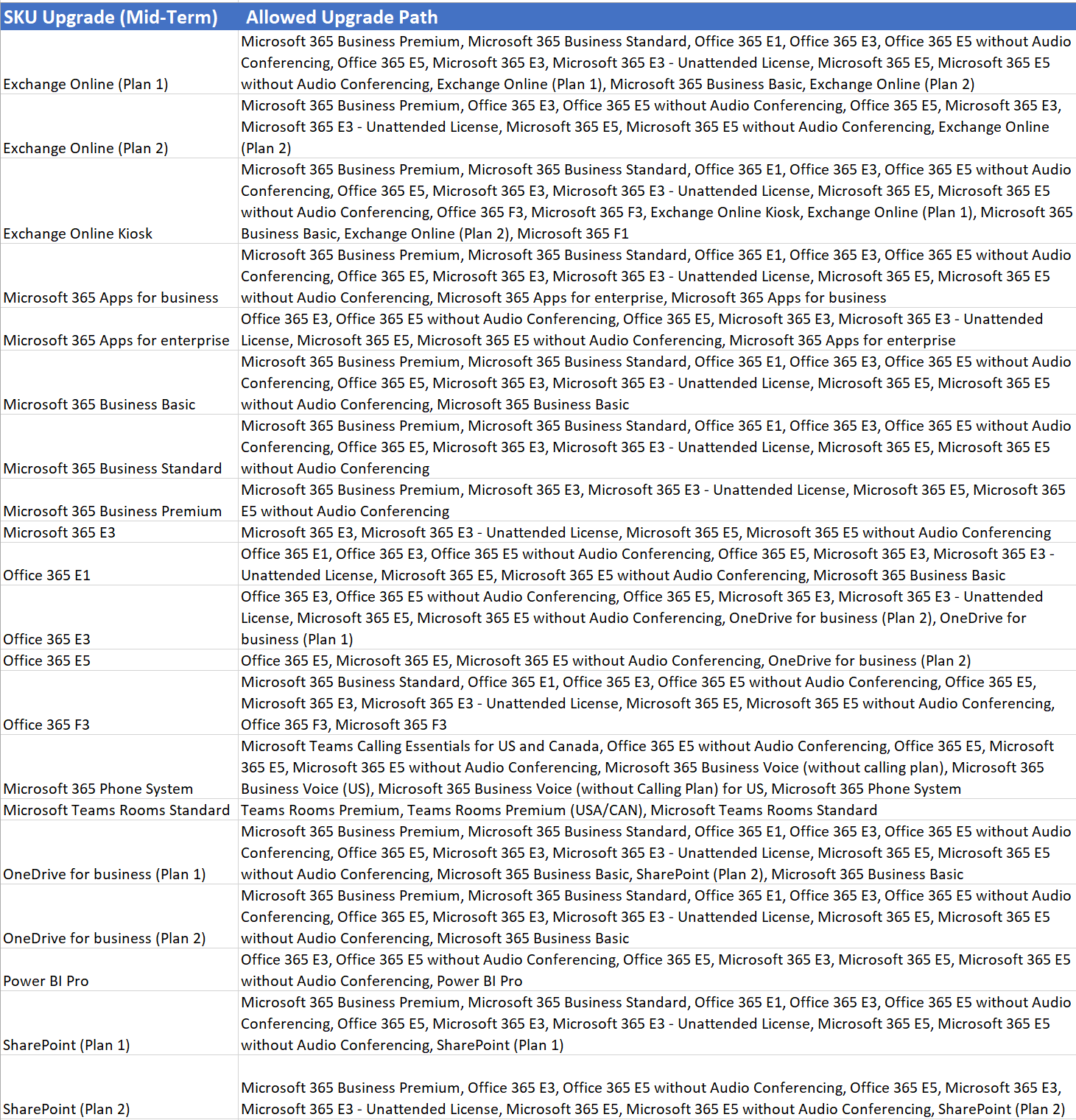
You can only change the product on a Subscription license within certain eligibility limits. Microsoft calls changing from one paid SKU to another eligible paid SKU an “upgrade.” You can “upgrade” one or more licenses to another eligible SKU at any time and the term of your annual Subscription will not change.
What product upgrades does Microsoft permit during the Subscription term?
Here is a graphic indicating the upgrades that Microsoft permits. Please note that this information is subject to change, and we have no control over the decisions that Microsoft makes in this or any other regard.
Can I change resellers in the middle of the term?
Microsoft does not permit a change of reseller (called a “channel”) in the middle of a license term. Once you purchase a Subscription from a reseller such as ourselves, you are committed to that reseller for the length of the Subscription term. Even if you cancel other services with a reseller, your Subscriptions survives any changes in the relationship. At the end of the license term (whether monthly or annual) you can cancel the renewal and purchase licenses (if desired) via another channel of your choice.
What is the license cancellation policy?
You will have one business day after we complete your order to cancel a license. A business day is defined as 24 hours after the time the license order is processed, excluding any weekends or holidays. So if you receive confirmation of a license purchase on Friday at 10am, you have until the following Monday at 10am to cancel for a prorated refund.
This applies to licenses contained in both monthly and annual Subscriptions.
If you cancel within one business day (by notifying us), you will be billed on a prorated basis from the time since the license order was processed by us until the time of cancellation.
If you don’t cancel within one business day (by notifying us), then you will be obligated for the entire license term (whether monthly or annual) and you will only be able cancel the license at the end of the term before the renewal.
What if Microsoft increases the price of an annual Subscription during the annual term
Your price for any licenses under the annual Subscription will not increase until the annual renewal. Even if you add more licenses to a current Subscription, the price for the new licenses will be the same as that of the originally purchased licenses in that Subscription.
On the other hand, if Microsoft increases the price for a monthly Subscription, your price for any licenses on that monthly Subscription will increase to the new price in the next month.
Can I pay monthly for annual licenses?
As of July 1, 2026, we no longer offer monthly billing for annual licenses. Paying annually is more cost-efficient for your company, and it simplifies billing on our end, saving us overhead costs which we can pass on to you.
If you currently have an annual Subscription billed monthly with us, you will be able to keep your Subscription. Please note that as per Microsoft’s requirements, you are obligated for the cost of the licenses for the length of the entire Subscription term, just as we are obligated to Microsoft for the cost of those licenses for the entire Subscription term.
How will we be invoiced?
Your monthly Subscriptions will continue to be billed monthly in advance.
Grandfathered Annual Subscriptions billed monthly will be billed on a monthly basis.
Annual Subscriptions billed annually (the least expensive option) will be billed in advance for the entire year-long commitment.
What about Azure?
Azure usage-based services are billed monthly in arrears. There is no premium for a monthly subscription.
Azure Reserved Instances & Windows 365 will continue to be billed monthly with no premium for a monthly subscription.
What about "add-ons" to user licenses such as Microsoft Defender?
The same pricing tiers apply to add-on licenses such as Microsoft Defender.
Add-ons can have a different licensing term than the license to which they’re attached. To avoid having to track multiple renewal dates, we recommend purchasing add-ons on the same date and with the same Subscription term and billing option as the base subscription so the annual renewal dates line up and billing is aligned.
What if I buy a new computer?
The licenses are applied per mailbox, so having a new computer will not change the licensing. On the new computer, someone will need to log into the Microsoft 365 portal with the user account and download the Office software onto the new computer.
What if I have other questions?
Reach out to us by calling or emailing the office. We’ll be happy to help. If we don’t have an answer, we’ll get one from our distributor and get back to you.






Certified New Jersey Women's
Business Enterprise
Copyright 2018-2024 by Geek Girls IT Services | Privacy Policy and Security Notification